Showing posts with label NoveList. Show all posts

Monday, April 4

Your Personal Readers' Advisory Librarian

 Have you ever been looking for your next book, but you don't know where to start?  What about finishing a series and you want another one like it?  You ask your friends.  You ask your librarian. Or maybe you don't want to ask because that last series you read was a a little risque and you don't want to admit how much you liked it.  Well, whatever the situation, we are here to show you how to find your next great read.  It's right at your fingertips at your library's website!

We're going to take you through this step by step and you are going to wonder where this wonderful tool has been all your life.  First, click on the link above and go to our website. 


Choose Explore  and then Novelist Plus  and then get ready to spend a little time doing what we like to call "book window shopping."  And make sure you've got your library card ready for the next step.


Type your library card number into the Patron ID box.  If you have any questions or problems with this step, call or visit your local branch.  Stop by if you don't have or have lost your library card too.  


Now that you're in, let's have some fun! Most of us have a favorite type of book that we like to read, so this is a great place to start.  Under the Recommended Reads List you can search by age and genre in fiction and non fiction.  There are even sub-genres for each one if you want to get more specific. 

There are also suggestions under I'm in the mood for books that are...  These are more specific and change periodically.  


Maybe you have a favorite author but have trouble keeping up with all of the books they have written or you can't remember the order of the books.  Just type in the name of the author in the search box on the home page and you can find all the answers you need.  Under the authors information you will see a list of their books.  Search by books and you can get them listed alphabetically or by date. Choose series and then you can see each series the author has written and the order of the books in it. This is great if you read anyone other than Janet Evanovich or Sue Grafton.  
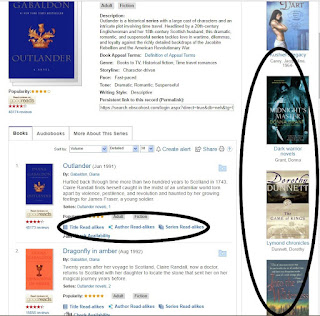


Maybe you just finished an epic, life-changing series and are heartbroken because the next book isn't coming out for two years or worse is finished. You want to read another book or series like it ASAP. We've got you covered.  Search for the series on the home page and you will see that each book not only has Title Read-alikes but author and series also.  Plus, there are always suggestions listed on the right side of your screen.  There is bound to be something to help you out in one of those lists. 


 Here is a sample of a read-alike list.  You can even print it out and hand it to your favorite librarian along with your library card and just tell them to pick one and surprise you.  Who knows?  You might find your next favorite series.


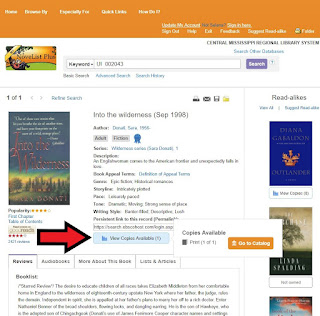
If you are the independent type, you'll love this feature.  When you choose a book to see more about it, it tells you how many copies are available in our library system.  If you click on that blue box, it will take you right to our library system's online catalog so you can order a copy and have it sent to the library of your choice.  


Now one more thing before we finish up. If you get in this website and get lost and can't remember all of the wonderful books you found to read, this will be your best friend.  Go to the top and create an account.  Then, when you find a book you want to remember, click on the folder (where the arrow is pointing) and it will save it for you.  


So the next time you get on the Novelist Plus site, all you have to do is sign in and click on the folder in the top right corner and all those great books you want to read are right there waiting for you.  


We hope you will learn to love this site as much as we do.  It such an easy way to find your next book.  Happy reading!


Wednesday, July 7

Online Resources Available at Your Fingertips

 In our mission to ensure we have free and easy to access resources for our patrons, we have online tools available to help students, teachers, job seekers, and many others. We have online tools from test prep to world books online, and if you do not see what you are looking for on our website then one of our librarians will be happy to help direct you in the right direction.

Highlighted Online Tools

ACT and Other Test Prep Resources

From the ACT to the ASVAB test we have you covered with practice tests to study guides. Some may require you to log in with your library card and pin.


Magnolia 

If you are needing to write a research paper here is the tool for you. Magnolia provides a large collection of newspapers, periodicals, reference books, journals, etc.


Mississippi DMV Practice Tests 
This DMV tool gives you access to practice tests if you needing your permit or driver's license. It also provides tests and manuals for cars, CDL, and motorcycles.


Job Resources 
By going to this tool you will see many links that will take you to websites to find jobs or books about how to find a job.


Freegal 
By using your library card to log in you will have access to 5 free music downloads a week and stream playlists for 3 hours each day.


Rocket Languages 

Needing to learn a new language for work or just for fun? Rocket Languages offers 15 different languages including American Sign Language.


Monday, July 13

A Little Help with What to Read Next

Does your local librarian come to your aid when you are looking for something new to read? We always try. Sometimes, however, even the experts need a little help. "I like Danielle Steel and want a book like hers" or "I just finished all of Stuart Woods' novels and need another author" are fairly easy requests to fill, but sometimes things are a bit more complex. Where is a librarian to turn when they need help with recommending a next read? Often we turn to NoveList Plus. This digital resource provides multiple ways to find recommendations for your next book. And with your CMRLS library card, it is a free service for our patrons.

Recently, a patron read Lisa Wingate's best selling novel, Before We Were Yours, and raved about how much she enjoyed the book. Of course, she went straight to Lisa Wingate's novels on our shelf and checked out a few others. It wasn't long before she returned to bring back the novels, disappointed that they were not to her liking. Enter NoveList Plus where we were able to access a list of books that were read-alikes for the book Before We Were Yours.  With this information, we were able to pull novels for the patron that were what she was seeking to read.

To access NoveList Plus, click on the Digital Library tab on our web page and select Virtual Reference Collection. We have many excellent digital resources available that may be accessed through the Virtual Reference Collection page. If you click to access NoveList Plus, you will be prompted to input your CMRLS library card number.  Simple searches are easy to do if you are familiar with navigating on the Internet. NoveList Plus is linked with our card catalog so you can elect to place a hold on an item when you locate what you want to read. For more complicated searches, you may contact your local branch for assistance or there are YouTube videos from EBSCO that may assist you as well. Simply enter "NoveList" into the YouTube search bar to see what videos are available.

Another help feature for locating a book can be accessed by clicking on the Explore tab on our web page, The librarians at Mississippi Library Commission will recommend titles for you if you answer a few questions. Click on BookMatch to try this service. You will notice you may also access NoveList through the Explore tab. The Explore section of our website is full of reader's advisory help. NextReads and GoodReads are a few other digital resources for book recommendations. And if you are forever forgetting what books you have read, check out Beanstack. With this app, you can participate in reading challenges, log the books you read, and even write book reviews.

Happy reading!


Wednesday, February 17

"What's good to read?"

A question heard many times a day at a library..."What's good to read?" Well, we could take a minute and poll the staff and any visitors in the library, but there is a much easier way.

Subscribe to a NextReads newsletter, a monthly newsletter from CMRLS that is populated with books that fit the genre you choose. And, what a list you have to choose from...Armchair Travel to Tween Reads. You won't have to subscribe to the newsletters if you don't wish to do so. Our Inboxes get pretty full, too! If you see a newsletter that you wish to read, click the name of the newsletter. You will get a short description of the content and whether the information comes to you monthly or every other month.


Place a checkmark beside any subject or subjects that interest you; provide your email address and sit back and wait for 8-10 reading recommendations in each scheduled email! If you wish to see the latest issue before you subscribe or if you just want to read them online, click the link View Latest Issue.

Once you've found a title in the newsletter that looks interesting, click it. The link takes you directly to the CMRLS Catalog where you may place a hold on the book, audio, or downloadable eBook or audio.
For those who want even more reading recommendations look for NoveList Content in the catalog. This is the information found when searching a James Patterson title, NYPD Red4. The first recommendations are other Thriller series. Click Show Titles below on of these and you are given the titles in the series, in order. Click Why this match? and see what about these books are like the original title you chose.


BEGINNING OF LIST SHOWING TITLES IN THE SERIES
 As always, if recommendations are still needed, ALWAYS ask, "What's good to read?"